


Location Share
3.8342.00 Reviews
App Specs
- Version
- 1.4.9
- Updated On
- License
- Free
- Downloads
- 10,000,000+
- Developer
- P & L Studio
- Categories
- Maps & Navigation
- Platform
- Android
Screenshots
 Analysis by AppCompare
I judge location-sharing apps by what happens after the first few days. A map can feel reassuring when everyone is testing it, but it only earns a place on my phone if it keeps helping without turning into another thing to manage. Location Share is aimed at a familiar problem: letting people coordinate and check that someone has arrived without a chain of calls and messages. Its appeal is easy to understand; the more important question is whether the people in your circle will keep using it willingly.
Who gets the most from a shared map
I can see the strongest case for Location Share in a small group that has a recurring reason to coordinate. Think of family members meeting at different entrances to a busy venue, friends heading to the same place from separate neighborhoods, or a household where someone wants to say “I’m nearly there” without stopping to type. In those situations, seeing a person’s position can answer a practical question faster than a message does.
A useful everyday routine is to agree on the purpose before anyone shares anything. For a family outing, that might mean using the map only while people are traveling to the meeting point, then switching sharing off once everyone has arrived. For a regular carpool, it could help the person waiting decide whether to stay outside or come back in. These are modest conveniences, but repeated small savings in calls and guesswork are what can make a tool worth keeping.
Make location sharing a deliberate habit
My main tip is to treat sharing as a group agreement, not as a setting one person imposes on everyone else. Decide who belongs in a circle, what the group uses the information for, and when sharing should stop. That conversation matters more than adding more people: a small circle with a clear purpose is easier to understand and less likely to feel intrusive than a broad list of acquaintances.
It also helps to think about the moment when location is actually useful. If the goal is simply to confirm arrival, a quick message may be enough. If people are moving toward one another or plans are changing along the way, a shared map can be more convenient. Keeping that distinction in mind prevents location sharing from becoming a default expectation for every trip.
Where it sits beside familiar alternatives
Compared with ordinary texts and calls, a location-sharing app can reduce the repeated “where are you now?” exchange, especially when plans are moving. Compared with a maps app used for directions, its value is the shared view of people rather than choosing a route to a destination. Neither alternative is automatically worse: a text is simpler for a one-off arrival check, while navigation is the better fit when the main need is turn-by-turn guidance.
I would not install a separate sharing app just because a group meets once. The benefit depends on other people joining and remembering the arrangement, so the setup can feel like extra work if everyone already has a method they trust. Location Share makes more sense when a regular circle wants a dedicated way to coordinate, not when one person hopes it will replace every conversation.
Worth Reading Before You Choose

EA SPORTS FC Mobile 26 Is a Bigger Football Game, but It Takes Time

Flipboard Shows What News Apps Must Do Beyond the Feed

Switching to Android Auto Means Rethinking Your Driving Routine

Google Calendar Makes a Crowded Week Easier to Manage

Ludo King Makes the Most of the Minutes Between Plans

Baby Panda World Brings Quick Play to Modern Phones, but Its Game Library Feels Busy
Questions worth settling before you rely on it
Before making a shared map part of a routine, I would check that everyone understands how to control their visibility and is comfortable participating. I would also agree on a backup plan: a call or message still matters if someone’s location is not updating as expected, a phone is unavailable, or plans change. A map is a convenience, not a substitute for communicating clearly or making safety decisions.
Geofence notifications can be useful when an arrival or departure is the key event, but they are not a reason to monitor every movement. Keep boundaries tied to a specific practical need, such as knowing when someone reaches a meeting area, and revisit them if the routine changes. This keeps alerts more meaningful and reduces the risk that a helpful feature starts to feel like constant oversight.
Privacy should be part of the decision, not an afterthought. The published description of a control does not remove the need for group trust: talk openly about who is sharing, who can see it, and when it is appropriate to stop. I would be cautious about using any location tool with someone who has not freely agreed to participate. That is especially important for families, where convenience for one person should not become pressure on another.
For someone deciding whether to try it, the practical questions are straightforward: will the people I need to coordinate with use it, do we have a recurring reason to share, and is a map better than a quick message for that situation? If the answers are yes, the app has a clear job. If not, it may add a setup step without changing how the group communicates.
Location Share is a free app in Maps & Navigation from P & L Studio. It has an Everyone age rating, an average rating of 3.9 from around 13,000 ratings, and over 10 million installs. I see those figures as signs that it has reached a broad audience, not proof that it will suit every group. Its usefulness still depends on a shared routine and on people feeling comfortable with the arrangement.
Getting Started with Location Share
First things first, downloading Location Share was a breeze. Available on both Android and iOS, it’s just a quick search away in the app store. Once installed, the setup was surprisingly simple. A few taps to set up my profile, and I was ready to roll.
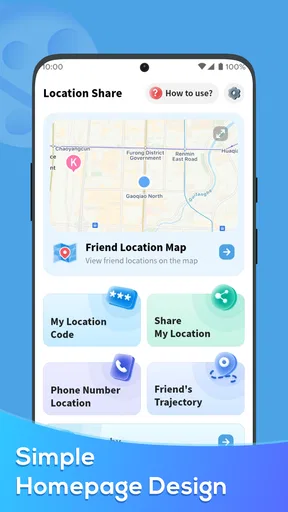
The interface is intuitive and user-friendly. Honestly, you don’t need to be a tech whiz to navigate through it. The main screen is clean, showing your current location on a map, and the menu options are straightforward.
Features That Stand Out
One of the things I love about Location Share is the ability to create groups. You can set up different circles for family, friends, or even coworkers. This way, you’re not broadcasting your location to everyone all at once. Privacy, right?
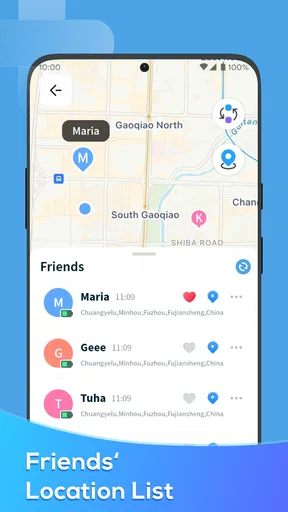
Another cool feature is the real-time location tracking, which is surprisingly accurate. I tested it out by sharing my location with a friend, and they were able to track my movements almost to the minute. Perfect for those "I’m on my way" moments.
"Sharing my location has never been this easy and stress-free!"
There’s also a feature for creating geofences. This lets you set up virtual boundaries and receive notifications when someone enters or leaves the area. It’s like having a digital guard dog that keeps you in the loop.
Practical Uses and Scenarios
Okay, let’s dive into how Location Share can be a lifesaver in everyday life. Say you’re organizing a big family gathering. You can make sure everyone is on track and nobody ends up at the wrong location. Trust me, it saves a lot of back-and-forth calls and texts.
For parents, this app is gold. You can keep an eye on your kids when they’re out and about, giving you peace of mind. And if you’re someone who travels a lot, it’s a convenient way to let loved ones know you’ve reached your destination safely.
Security and Privacy Matters
Now, I know what you’re thinking—what about privacy? Well, the developers have done a solid job here. You have full control over who sees your location and when. The app requires consent for location sharing, and you can easily toggle your visibility.
Plus, all data is encrypted, so you don’t have to worry about your information being leaked or misused. It’s reassuring to know that your privacy is a priority with this app.
Wrap-Up: Is Location Share Worth It?
So, after spending some quality time with Location Share, I have to say it’s a pretty nifty tool. It’s practical, easy to use, and packed with features that make life a tad bit easier. Whether you’re coordinating with friends or ensuring your family’s safety, it’s got you covered.
Would I recommend it? Absolutely! If you value convenience and peace of mind when it comes to location sharing, give it a shot. You might just wonder how you ever managed without it.
Ready to try it out? Head over to your app store and give Location Share a download!
The first-week appeal and what lasts
The first week is usually the easy part: everyone opens the map, checks how the groups work, and enjoys having fewer coordination messages. The month-to-month test is different. A shared map earns lasting space when it solves a problem that happens often enough to justify keeping the app installed. A regular commute, school pickup, or recurring family meetup gives it a clearer role than occasional trips with no predictable pattern.
I would start with one small circle and one purpose rather than trying to organize every contact at once. That makes it easier to tell whether the app is genuinely helping. After a few weeks, ask the group whether it has prevented confusion or simply become another screen to check. If it is not saving effort, there is no virtue in keeping location sharing active out of habit.
Maintenance is mostly social
The ongoing work is less about managing a map and more about keeping expectations sensible. People’s plans change, group membership changes, and a location that was useful during a weekend trip may not be appropriate as a permanent arrangement. I would revisit who is included whenever the purpose changes, and make it normal for anyone to pause sharing without having to defend the decision.
There is also a practical distinction between a location that helps with coordination and one that someone treats as a guarantee. A displayed position can help a friend choose where to wait, but it cannot explain why a person stopped moving or whether they are free to respond. If a situation matters, pair the map with direct communication instead of reading too much into a dot.
When the convenience starts to wear thin
Location sharing can create fatigue when alerts and checks become more frequent than the useful decisions they support. Geofences are most valuable when an arrival or departure changes what someone should do next. If every ordinary movement prompts attention, the feature may make a simple routine feel monitored. I would keep boundaries selective and remove ones that no longer serve a clear purpose.
Another source of friction is uneven participation. If only one person shares, or some members forget the arrangement, the group may fall back to messages anyway. That does not make the app pointless, but it does mean the benefit is shared: it works best when everyone understands the routine and agrees it is worthwhile. For a one-time meetup, a temporary message thread can be quicker and easier.
Fit, compatibility, and sensible expectations
On Android, the listed minimum operating system is version 6.0, and the current version is 1.4.9. It was released on May 31, 2023. Those details help establish whether an older Android device meets the stated baseline, but they do not decide whether the app fits your habits. iOS users should check the app’s current availability and requirements in their own store before installing, since compatibility can vary by device and operating system.
The app is free, which makes a low-commitment trial reasonable, but I would still treat the real cost as attention and participation. A group needs to agree on how it will use the map, and each member should feel free to stop. If you only need directions, use a navigation tool; if you only need to say you have arrived, send a message. Location Share is most compelling in the middle ground, where several people are moving and the shared view repeatedly saves coordination.
My lasting verdict
I would recommend trying Location Share for a household or close-knit group with a recurring coordination problem, especially when seeing progress on a map is more useful than exchanging updates. Its groups and geofences give that routine shape, while the straightforward map makes the basic idea approachable. I would not recommend treating it as a permanent attendance tracker or assuming that a location display replaces trust and conversation.
For me, the deciding test is simple: after the novelty fades, does the app make a repeated part of the week easier without making anyone feel watched? If the group can answer yes, it has a practical reason to stay. If the answer is no, turning to a message or a standard maps app is a perfectly sensible choice. That balance—useful when needed, easy to set aside when not—is what determines whether this location-sharing tool deserves a lasting spot.
Pros
- User-friendly interface for easy navigation.
- Real-time location updates enhance safety.
- Customizable privacy settings available.
- Battery-efficient location tracking.
- Seamless integration with contacts.
Cons
- Limited offline functionality.
- Occasional GPS accuracy issues.
- Requires constant internet connection.
- In-app ads can be intrusive.
- Some features locked behind paywall.
FAQs for Location Share
What is Location Share and how does it work?
Location Share is an app designed to help users share their real-time location with friends or family. It uses GPS technology to provide accurate location updates. Users can control who sees their location and for how long, making it a secure and practical tool for coordinating meetups or ensuring safety.
Is my privacy protected while using Location Share?
Yes, Location Share prioritizes user privacy by allowing you to choose who can view your location. You have the option to share your location temporarily or permanently, and you can stop sharing at any time. The app also uses encryption to protect your data from unauthorized access.
What platforms is Location Share available on?
Location Share is available for both Android and iOS devices. You can download it from the Google Play Store for Android or the Apple App Store for iOS. The app is designed to work seamlessly across different devices, ensuring a smooth user experience for everyone involved.
Does Location Share consume a lot of battery power?
Location Share is optimized to minimize battery usage. While using GPS can be battery-intensive, the app is designed to update location data efficiently, reducing the overall impact on your device’s battery life. You can also adjust settings to further conserve energy if needed.
Can I use Location Share without an internet connection?
While an internet connection is necessary for real-time updates and sharing, Location Share can still function offline. The app will store your location data and update it once a connection is re-established. However, for the best experience, maintaining an internet connection is recommended.


